
Visitor NDA sign in
Visitor NDA sign in: your wording accepted at the door, and the record kept
An R&D lab, a medical device plant, an engineering site with a customer’s drawings on the floor. Every visitor is to accept your non-disclosure wording before they go further than reception, and a year from now you want to show who accepted which wording, and when. This page says exactly what the kiosk does with that, read from its own code, and just as exactly what it does not.
Sign in on a demonstration kiosk, then open the fire roll call on your phone. Do not enter real details: everything typed is deleted within the hour.
At the door
Four screens, one of them yours
The visitor flow is fixed: a form, your wording, a button, a record. What you write is the only part that changes.
- 1
The visitor signs in
They press Sign In and enter their name, their company and the person they have come to see, with a vehicle registration if they drove in. That is the whole form.
- 2
Your wording is shown
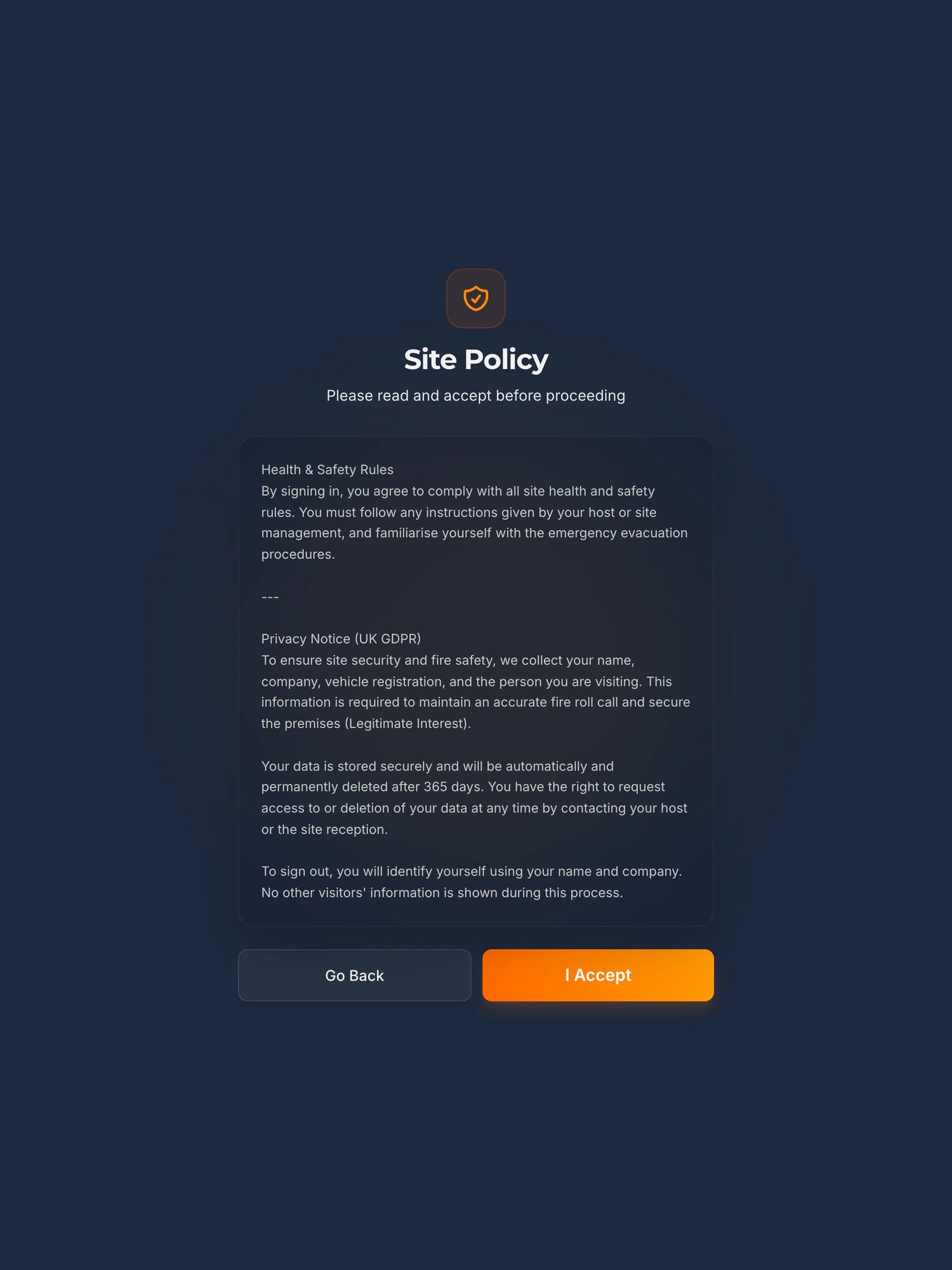
The next screen is headed Site Policy, with the line “Please read and accept before proceeding”. Your non-disclosure wording is in a scrolling panel under it, followed by the kiosk’s own UK GDPR privacy notice, which states how long the record is kept.
- 3
One of two buttons
Go Back returns them to the form and records nothing. I Accept sends the sign in, carrying the fingerprint of the exact text that was on the screen.
- 4
The record is written
The server refuses any sign in that does not carry the acceptance. The visit is stored as accepted, with the fingerprint and a link to the stored text, and the sign in time is the acceptance time. The host is told, by name, that the visitor has arrived.
The record
What is kept, for how long, and how you get it back
Each line below describes what the kiosk’s code does, not what a brochure would like it to. Where the honest answer is a limit, the limit is stated.
- Who and whenName, company, the person they came to see, a vehicle registration if they gave one, the time they signed in and the time they signed out. The sign in time is the acceptance time: the button and the sign in are one action, so there is no second moment to record.
- Which wording, exactlyThe text on the screen is stored once, as served, and identified by its SHA-256 fingerprint. The visit carries that fingerprint and a link to the text. Change one character of your NDA and the kiosk stores a new document with a new fingerprint; every visitor who accepted the old wording keeps pointing at the old wording.
- Read back, on screenOn the dashboard’s History page, each visit has a Policy button. It opens the visitor’s name, “Accepted at check-in” with the date and time, the wording’s fingerprint, the date that wording came into use, and the full text. Where a wording cannot be established, for a visit that predates the trail, it says so rather than showing you today’s text.
- For how longThe visit record lives for the retention period you set: a year unless you change it, anywhere from one day to two years, and it is deleted automatically after that. When the visit goes, the acceptance goes with it, so set the period to match how long you need to show it. The stored wordings are kept, because they hold no personal data.
- ExportedThe register exports from the dashboard as a spreadsheet for any date range: name, company, host, signed in, signed out. The accepted wording is not a column of that file; it is opened per visitor on screen, and the fingerprint is copied from there.
- WhereIn the European Union, in Ireland, on ISO 27001 certified infrastructure, under a data processing agreement supplied as standard. The security page lists every sub-processor and where each one is.
If a customer has asked for this under TISAX, the line they are reading is VDA ISA prototype protection control 8.1.7, which requires a “documented non-disclosure obligation prior to access”. The TISAX page quotes the control and says which version of the catalogue applies when.
Where the data lives, and who touches itThe same record, for an ISO 27001 auditorEvery price, in public
Read this before you buy
What it does not do
Most of these are the questions a solicitor or a customer’s security team will ask about the record, so they are answered here rather than on the call.
- No signature. Nobody draws on the screen or types their name as a signature. The record is the button, the time and the fingerprint of the wording. The only signature pad in the product is in the permit to work module, and it is not part of this screen.
- No questions. The kiosk does not ask anything and stores no answers. It shows one text and records that it was accepted.
- One wording per site. Everyone who signs in as a visitor at a site sees the same text, so write it for all of them: the customer, the auditor, the driver who signs in. The wording is set for the company, and a site can override it with its own.
- Plain text, in a panel. Your NDA goes in as text, without headings, formatting or an attached document, and it sits above the privacy notice in the same panel. The panel scrolls, and nothing makes the reader reach the end of it before I Accept is live.
- Nothing is sent to the visitor. No copy of what they accepted is emailed or printed for them. If your NDA needs the visitor to hold a copy, that is a step for reception.
- Contractors on a permit do not see it. A contractor arriving through the permit to work module’s own flow reads their RAMS and signs their permit on their own phone. They are not shown the Site Policy screen. A contractor who signs in as a visitor is.
- It does not route anyone. Go Back returns the visitor to the form and records nothing. What happens to somebody who will not accept your wording is your reception’s decision, not the kiosk’s.
- It does not make the agreement binding. Whether your wording binds a visitor is a question for your solicitor, and whether an accepted screen satisfies your customer is theirs. The kiosk produces the record: who, when, and exactly what was on the screen.
See the sign in
A visitor signs in, and the list it feeds, in 100 seconds
A visitor signs in on the iPad. The alarm goes. The marshal opens the live list on their phone at the muster point and reads off who is still on site. The same sign in that records the acceptance is the one that puts them on the roll call.
The player loads from YouTube only when you press play. Nothing is sent to Google before that. What happens when you do.
Before you ask
The questions sites with an NDA at the door ask
Does the visitor sign the NDA on the kiosk?
No. They read your wording and press I Accept, or press Go Back and do not sign in. There is no signature pad in the visitor flow and no typed name. What is recorded is that this person accepted this exact wording at this time, with the wording kept and fingerprinted so it can be shown later.
Can we show which version of the NDA a visitor accepted after we have changed it?
Yes. Each wording is stored once, as served to the kiosk, and identified by its SHA-256 fingerprint. A visit carries the fingerprint of the wording that was on screen, not a reference to whatever the setting says now. Edit the text and you get a new document; earlier acceptances keep pointing at the earlier one, and the dashboard shows the date each wording came into use.
Can we show the NDA only to some visitors?
No. One wording is shown to everyone who signs in as a visitor at a site. It is set for the company, and a site can override it with its own, but there is no wording per visitor type and no way to skip it. Contractors arriving through the permit to work module see their RAMS and permit instead, not this screen.
How long is the acceptance kept?
For the retention period you set on the visit record: a year unless you change it, anywhere from one day to two years, after which the visit is deleted automatically and the acceptance with it. The stored wordings themselves are kept, since they hold no personal data. Choose the period to match how long you need to be able to show the record.
Can we export the acceptances?
The visit register exports as a spreadsheet for any date range, with name, company, host, signed in and signed out. The accepted wording is not a column of that export. It is read per visitor on the dashboard, where the full text and its fingerprint can be copied.
Is this enough to enforce an NDA?
That is a question for your solicitor, and we are not one. What the kiosk gives you is the record: the name, the time, and the exact text that was on the screen when I Accept was pressed, kept for the period you set. Whether that record, and your wording, do what you need is yours to decide with somebody qualified.
Also asked of sites like yours
The other things somebody may ask you to evidence
Each of these is a page about one standard, one duty or one visitor, written the same way as this one: what it actually asks for, what an iPad at reception records towards it, and where it does not help.
Every standard on one page: the clause numbers, the version and the date each was read, on one printable table.
- GDPR and the visitor book
- CMMC physical security
- List X visitor control
- ITAR visitor log
- Def Stan 05-138 visitor access
- ISO 27001 visitor access
- PCI DSS visitor log
- AEO visitor access control
- CTPAT visitor log
- TISAX visitor management
- TAPA FSR visitor log
- BRCGS visitor control
- BRCGS packaging visitor control
- BRCGS storage and distribution visitors
- BRCGS unannounced audit
- Visitor control non-conformity
- SALSA visitor control
- IFS Food visitor hygiene
- UFAS feed mill visitor control
- GMP visitors in production areas
- GDP wholesale visitor control
- Fire roll call
- Contractor management
- Construction work in occupied premises
- HSE inspection records
- ISO 45001 contractor control
- Visitor record retention
- What a visitor log must contain
- Standards calendar
- Sign in sheet template
- Visitor health questionnaire template
- Contractor induction template
- Permit to work template
- Hot work permit template
- Fire drill record template
Advise sites on this standard? Referral terms are on one page.
Next step
Bring your NDA wording to the call
Fifteen minutes on the phone. Bring the wording your visitors are meant to accept and what your customer or your auditor has asked to see, and we will tell you straight whether the record above is the record you need. If it is not, we will say so.
Book a 15 minute callNo site visit needed and nothing to install. Setup from £599 includes putting your wording on the screen and training reception.
Would rather email? [email protected]
Not the person who signs it off? Send them the one page business case
The platform reference is JK Powell, a Derbyshire metal packaging site whose visitors accept the site rules on the same screen.