
Digital visitor book
Digital visitor book for UK sites: what it records and what it costs
The reception book, on a screen, with the record kept for you and not left open on the counter. This page says what a digital visitor book should record, what the options cost, cheapest first and two of them free, and what ours does and does not do. We sell one, so weigh it accordingly.
General information, not legal advice. Each standard and each law mentioned here is quoted, with its source, on the page linked beside it.
What it is
The visitor book, with the record kept for you
A digital visitor book, also sold as an electronic visitor book, a digital visitors book, a digital visitor log or a visitor book app, replaces the bound book at reception with a screen. The visitor enters their name, their company and who they are here to see, and signs out on the same screen when they leave. Each entry is stored with the date and the time, so nobody reads the last visitor’s details off an open page, and one person’s record can be found without turning pages. It can be a form on the visitor’s phone, an app on a tablet you own, or a kiosk somebody supplies and looks after.
What it should record
Four things a digital visitor book has to get right
No single rule sets the fields. It depends on who asks to see the record, so start from the standard or the customer you answer to. Every field you cannot justify is one you should not be collecting.
Who, from where, to see whom, and when
It depends on the standard. PCI DSS 9.3.4 names the visitor’s name and organisation, the date and time, and the person authorising access. CTPAT 10.2 lists six fields, including time of departure. Others, BRCGS, SALSA and IFS Food among them, name no field at all.
The time they left
Signing in gets a visitor through the door. Signing out gets them nothing, so people do not, and the record then says twelve people are on site when four are. On a kiosk the sign out button is on the screen in front of them as they leave.
What they were told
Under UK GDPR you tell people what you are collecting and why at the point you collect it. A screen can show that wording where the details are entered and record that it was shown.
Nothing past its date
There is no period set in law. You decide it, write it down, and apply it consistently. PCI DSS 9.3.4 says at least three months, TAPA FSR 2026 at least 30 days, and UK GDPR no longer than necessary.
The paper book
What goes wrong with the paper visitor book
A paper visitor book is lawful. No law says a register has to be electronic, and anybody telling you a book is illegal is selling something. It is hard to run well, and it comes apart in four places.
Is a paper visitor book GDPR compliant? The long answerStaying on paper: the free printable sheets
- The open page. An open book shows the previous twenty entries, names, companies, car registrations, sometimes mobile numbers, to the twenty-first person to pick up the pen.
- No end date. Filled books go in a drawer, and the drawer has no end date. Eleven books in a cupboard is not a retention policy.
- Finding one person. Getting one visitor’s entry out of a paper page means photocopying and redacting everybody else who signed that day.
- The alarm. Nobody signs out, and a book left on the reception desk does not come out with the fire marshal.
The options
Five ways to replace the open book, cheapest first
Two of the five are free, two are not digital at all, and the one we sell is the most expensive, so you can weigh what follows accordingly.
| Option | What you get | What it leaves | What it costs |
|---|---|---|---|
| Printed sheets that reception fills in | Not digital, and still the cheapest fix for the open page: the visitor never reads the sheet, and the privacy notice is printed at the top. | The shredding is still somebody’s job, the register still has to be carried out in a fire, and finding one person means reading sheets. | Free. Ours are on this site, with no form to fill in. The printable sheets |
| A QR code and Microsoft Forms | A digital visitor log you can build in about an hour: a typed, time stamped row per visitor in a spreadsheet you can filter. | Nobody signs out, the roll call is a workbook on a phone, anyone with access can edit the record, and deletion is manual. | Free, if your business already has Microsoft 365. The eight step guide |
| A “GDPR” visitor book with peel-off or carbon slips | Still paper. It stops the next visitor reading the last one’s details, which is the most visible problem. | Retention, finding one person’s record, the privacy notice, nobody signing out, and a roll call that is inside the building. | More than a plain book, and bought again when it is full. |
| A self serve visitor book app on your own tablet | What a dedicated system is for: sign in and out on a screen, records kept and deleted by rule and not by memory. | You buy, mount, configure and support the hardware, and you own the rollout. | Sign In App publishes its entry tier at £415 a site a year, hardware separate. Less than a third of our price. Our comparison, including where they win |
| A managed kiosk, which is what we sell | The same, with the iPad and stand included, set up for your site, a live fire roll call on any phone, and somebody to ring. | It costs the most of the five, and we are one person, not a support desk. | £150 a month plus VAT, setup from £599. Every price, in public |
Sign In App’s price is their published list price, checked September 2026; check it against their own pricing page before you rely on it.
A self serve app of our own, on an iPad you already own, is not built.Tell us if you would use one.
Ours
Noon Elite’s digital visitor book is an iPad kiosk
An iPad in a locking stand at reception, supplied and looked after by us.
What it records
Name, company, who they are here to see, and a registration if they have driven in, with the date and the time in and out. Visitors and contractors sign out on the same screen when they leave.
Your site rules, accepted by name
Your site rules and the privacy notice go on screen, and nobody is signed in until they accept them. Each acceptance is stored against the person with the date, the time and the exact wording they accepted.
A fire roll call on a phone
When the alarm goes, your fire marshal opens the live list on their phone at the muster point and sees every visitor and contractor currently signed in. Nobody goes back inside for the book.
Teams or Slack told, the record kept
Each sign in posts a message to your Microsoft Teams or Slack channel with the visitor’s name, their company and who they are here to see. Records can be searched by name, company and date, exported, and are deleted automatically at the end of the retention period you set.
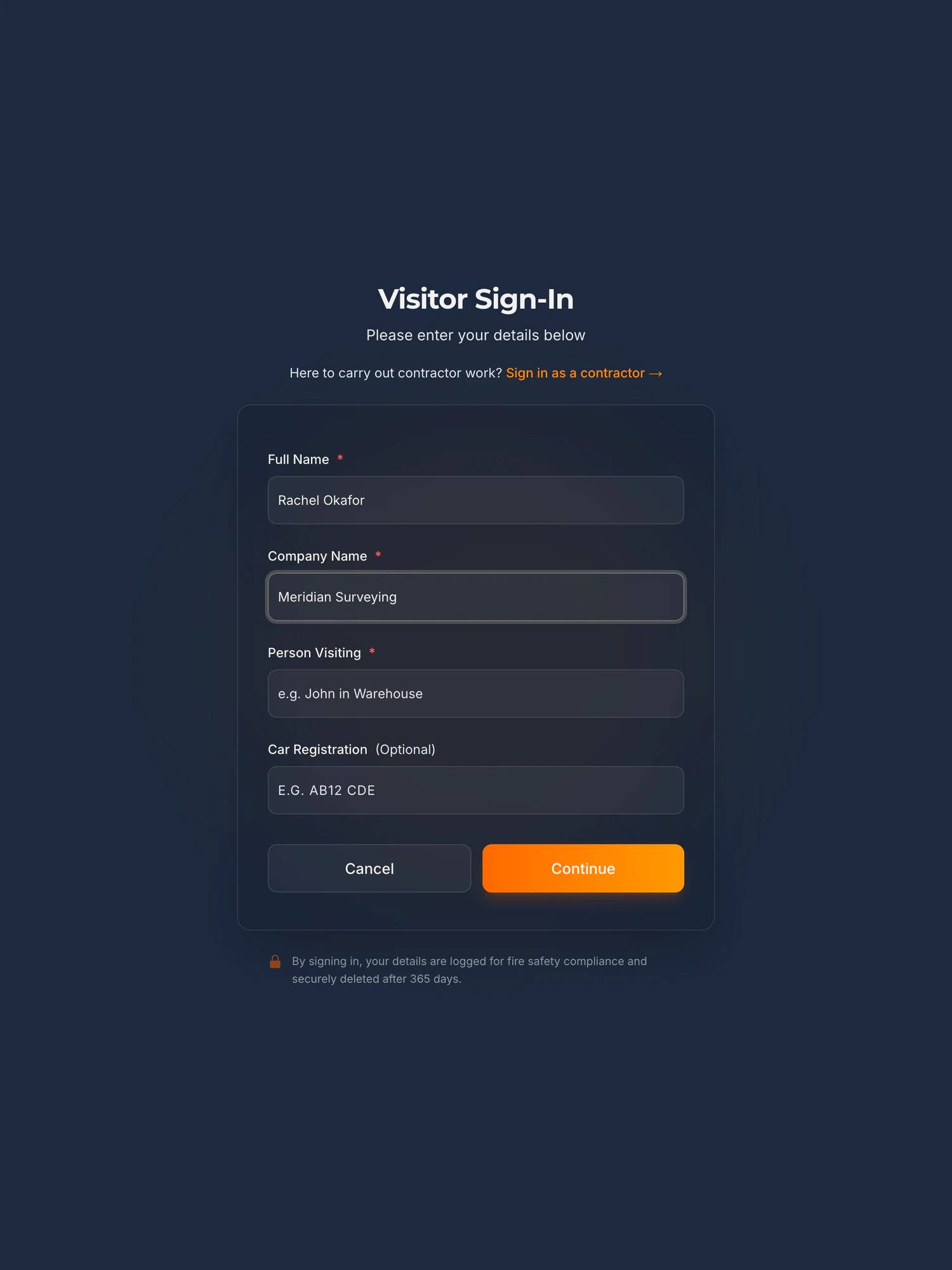
Sign in on a demonstration kiosk, then open the fire roll call on your phone. Do not enter real details: everything typed is deleted within the hour.
£150 a month plus VAT for the platform, with setup from £599 and modules at £150 a month each. iPad, stand and support included. We install in person around the East Midlands, and further afield in person by arrangement.
The visitor management kiosk in fullThe fire roll call systemEvery price, in publicWatch it work, in under two minutes
Being straight with you
What our kiosk does not do
- It does not make a site compliant with anything. It keeps a timestamped record of who was on site and what they accepted.
- No questions, answers or signatures in the visitor sign in. The visitor accepts your wording and that acceptance is recorded, with the exact text.
- No pre-registration or pre-visit email for visitors. A visitor is recorded when they sign in at the kiosk.
- No employee time and attendance. The roll call lists visitors and contractors, not employees, so your marshal still needs your staff list.
And when to keep the book
The paper book is fine if
- You have fewer than about ten visitors a week.
- Nobody audits you: no customer audits, no certification audits.
- Nobody on site can sign for £150 a month, or should.
Before you ask
Questions people ask about a digital visitor book
Is a digital visitor book GDPR compliant?
The tool does not decide that. What decides it is the same four things as for a paper book: you collect only what you need, you tell people why at the point they give it, you keep it secure, and you delete it when you said you would. A digital visitor book makes those easier to hold to. It does not hold to them for you, and no kiosk makes a site compliant.
Can a digital visitor book work on an iPad?
Yes. Ours is an iPad in a locking stand at reception, supplied by us and replaced by us if it fails. If you are building your own from a form, an iPad you already own will do: Apple’s Guided Access holds the device on one app, and our free guide covers the rest.
Do visitors need an app?
No. With our kiosk the visitor signs in on the iPad at reception and needs no phone and no app. The fire marshal does not install one either: the roll call is a link opened in the browser of the phone already in their pocket. With a QR code and a form, the visitor uses the camera on their own phone.
How long should a digital visitor book keep records?
There is no period set in law. You decide it, write it down, and apply it consistently. PCI DSS 9.3.4 says at least three months, and UK GDPR says no longer than necessary. Our kiosk keeps one period per company, from one day to two years, twelve months by default, and deletes records past it automatically.
What does a digital visitor book cost?
From nothing to £150 a month. A QR code and Microsoft Forms is free if your business already has Microsoft 365. One self serve app, Sign In App, publishes its entry tier at £415 a site a year, with hardware sold separately. Our managed kiosk is £150 a month plus VAT with setup from £599, and the iPad, stand and support are included.
Also asked of sites like yours
The other things somebody may ask you to evidence
Each of these is a page about one standard, one duty or one visitor, written the same way as this one: what it actually asks for, what an iPad at reception records towards it, and where it does not help.
- GDPR and the visitor book
- CMMC physical security
- List X visitor control
- ITAR visitor log
- Def Stan 05-138 visitor access
- ISO 27001 visitor access
- PCI DSS visitor log
- AEO visitor access control
- CTPAT visitor log
- TISAX visitor management
- TAPA FSR visitor log
- BRCGS visitor control
- BRCGS packaging visitor control
- BRCGS storage and distribution visitors
- BRCGS unannounced audit
- Visitor control non-conformity
- SALSA visitor control
- IFS Food visitor hygiene
- UFAS feed mill visitor control
- GMP visitors in production areas
- GDP wholesale visitor control
- Fire roll call
- Contractor management
- Construction work in occupied premises
- HSE inspection records
- ISO 45001 contractor control
- Visitor NDA sign in
- Visitor record retention
- What a visitor log must contain
- Standards calendar
- Sign in sheet template
- Visitor health questionnaire template
- Contractor induction template
- Permit to work template
- Hot work permit template
- Fire drill record template
Next step
Tell us what your visitor book has to do
Fifteen minutes on the phone. Tell us how people sign in today and who, if anybody, asks to see the record, and we will tell you straight which of the five options fits, the free ones included.
Book a 15 minute callNo site visit needed and nothing to install. If it is not a fit we will say so on the call.
Would rather email? [email protected]
Not the person who signs it off? Send them the one page business case