
TAPA FSR 2026, section 4.1
TAPA FSR visitor log: what the 2026 standard asks of a warehouse front desk
Your buyer has asked for a TAPA certificate, or your auditor is due, and section 4.1 is the part of the standard about the door your visitors use. It asks for photo ID, a register kept for thirty days that shows who was visited and why, badges reconciled as people leave, and a log somebody checks every day. All of it is quoted below from FSR 2026, with its security levels, and beside each line is what an iPad at the entry point records towards it, including the two lines it does not.
Sign in on a demonstration kiosk, then open the fire roll call on your phone. Do not enter real details: everything typed is deleted within the hour.
From £150 a month plus VAT, iPad and stand included. We are not auditors or consultants.
In Ireland or elsewhere in the EU? The installed kiosk on this page is sold in the UK. For EU sites: the same software on an iPad you already own, with the record kept in the EU, from €179 a month.
What the standard asks
Five requirements at the visitor entry point, and one for the central function
FSR 2026 is a table. Each requirement carries the security levels it applies to, A, B or C, in a column beside it, and the letters below are copied from that column. Level A is elevated security protection, B moderate and C standard, and the buyer negotiates which one your facility is certified to.
4.1.5, levels A, B and C
Registered, kept 30 days, and traceable
All visitors to the office area registered and log maintained for minimum of 30 days. Visit details, such as which individual will be visited, what is the reason for the visit, must be traceable through the information recorded in the visitor log.
The visitor log requirement, at every level. Three things: a register, thirty days, and enough in the record to trace who was visited and why. The second sentence is new in FSR 2026; the 2023 standard stopped at thirty days. Read it against your book before the auditor does, because the reason for the visit is the field most books do not have.
4.1.4, levels A, B and C
Photo ID at the door
All visitors to the office area identified using government-issued photo-ID (e.g. driver’s license; passport or national ID card, etc.). If Digital IDs are accepted by the facility and allowed by local legislation, a robust verification process (including all required technical infrastructure) must be in place.
A person’s act, not a system’s. The receptionist or guard looks at the document and at the face. The digital ID paragraph is new in 2026. What a record can add is that the person who checked the ID is named on the visit, and the time is stamped.
4.1.6, levels A and B
Badges reconciled, log checked daily
All visitor badges must be reconciled as the visitor leaves the premises and the full log checked daily.
The half of the visit a paper book loses most often. Reconciled means the badge came back and the log says the visitor left; checked daily means somebody looked at the whole list before going home and found nobody still on it who should not be.
4.1.7, levels A and B
Badges displayed, visitors escorted
All visitors visibly display badges or passes and are escorted by company personnel.
Two things an auditor can see on the floor without opening a file. The badge needs a name and a date on its face, and something that tells an operative whether the wearer should be alone in the racking.
4.1.1, levels A, B and C
A trained person at the entry point
Visitor entry point(s) are controlled by an employee/ guard/ receptionist that has been trained on badge issuance, controls, logging, visitors, escort requirement, etc. (process in place for when employees check in their own guests and when visits are outside operational hours).
The requirement that decides whether the rest work. Note the bracket: there has to be a process for a member of staff signing in their own guest, and for a visit at seven on a Sunday when nobody is on the desk.
9.4.1, levels A, B and C
Multi-site: the central function and its records
The central function shall have procedures in place to ensure all sites maintain records of inspections, visitor logs, driver logs and 7-point inspection etc.
For a multi-site certification. The central function has to be able to show that every depot keeps its visitor log, which is a different question from whether each depot keeps one. Section 4.3.1, beside all this, asks for drivers to be identified by photo ID and a driver log maintained.
Quoted from TAPA FSR 2026, Facility Security Requirements, Issue1.2026, which TAPA says became effective on 15 September 2026, and from the FSR 2026 Certification Framework Document for the levels, both read on 26 September 2026. TAPA’s own spelling is kept inside the quotations. A site certified against FSR 2023 will know the same requirements as 7.3.1 to 7.3.7 and 8.4.1. Nothing in the standard tells you to buy anything: a paper log with a column for the host and the reason, badges counted back in at the door and a person who reads the whole page at five o’clock can satisfy 4.1.5 and 4.1.6. What paper struggles with is the auditor’s request for one date last month, the sign out time, and knowing at the muster point who is still inside.
The record
What the kiosk holds against each line, and the two it does not
Each line below describes what the kiosk’s code does, not what a brochure would like it to. Where the honest answer is a limit, the limit is stated, and two of them matter for this standard.
- RegisteredThe sign in form asks for the visitor’s name, their company, the person they have come to see and, if they drove in, their vehicle registration. Name, company and host are required, so nobody at the desk can skip them. The sign in time is stamped by the server, not typed.
- Which individual will be visitedA host is required on every sign in, stored with the visit, and told by name in Microsoft Teams or Slack the moment the visitor arrives.
- The reason for the visitNot a field. The form is fixed, and it does not ask why the visitor has come. If your auditor reads 4.1.5’s second sentence as requiring the reason in the log itself, the kiosk record on its own does not carry it, and you will need the host’s booking, the appointment or the delivery note beside it. We would rather say that here than on the call.
- Kept 30 daysYou set one retention period for the company, anywhere from one day to two years, with a year the default, and records are deleted automatically when it expires. Thirty days sits inside that range; set the period to at least that, and longer if your buyer asks for it.
- Badges, displayed and reconciledWith the badge module, the label prints the visitor’s name, company, host and the date with a colour band for their clearance, so an escorted visitor and a cleared contractor look different on the floor. Where the site requires approval, nothing prints until a named approver enters a PIN on the kiosk, and the audit trail records who that was. The badge is paper: collecting it at the door is reception’s act, and the record shows when the visitor signed out.
- Signed out, and the daily checkThe visitor signs out by name on the kiosk, or reception signs them out on the dashboard, and the time is stamped. The live on site list is the daily check 4.1.6 asks for: open it before the shift ends and everyone still on it is either in the building or forgot. Anyone still open at 23:59 UTC is signed out by the system at that time, so a check the next morning shows the sweep, not the departure.
- Photo IDNot checked by the kiosk. The person at the entry point looks at the document, as 4.1.4 says. The record carries the name they gave and the host who took them in.
- Where it livesIn the European Union, in Ireland, on ISO 27001 certified infrastructure, under a data processing agreement supplied as standard. The security page lists every sub-processor and where each one is.
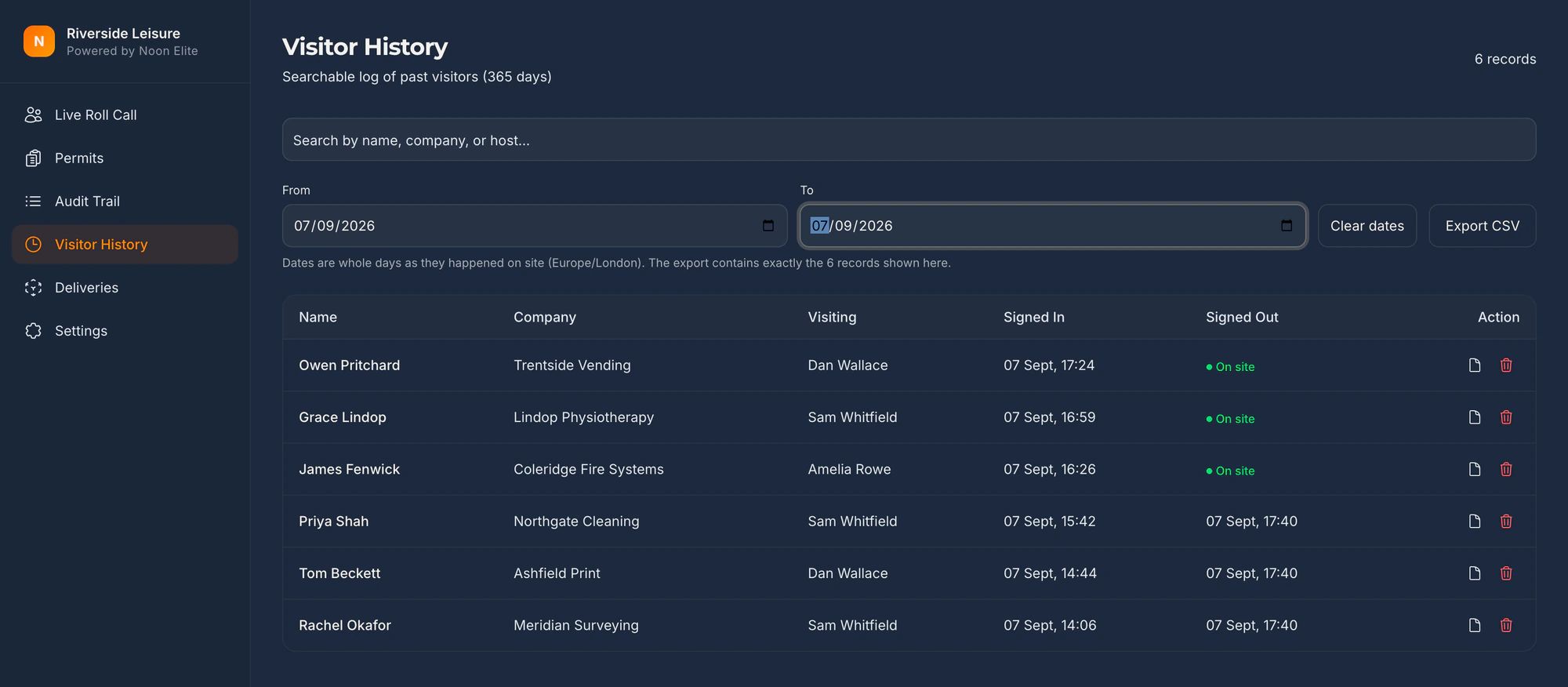
The kiosk does not make a site compliant, certified or audit ready. It produces a timestamped record for the requirements named on this page, and the auditor decides what that record is worth.
The visitor management kiosk in fullThe same door, for HMRC’s AEO security criteriaThe same log, with its own retention line, under PCI DSSMore than one depot, for 9.4.1Our security and sub-processors
On the day
What gets asked, and what you put in front of them
| What you are asked | What you show them |
|---|---|
| Show me your visitor log for a date last month. | A filtered, timestamped list on screen in seconds, exported to a file the auditor can keep, with name, company, host, signed in and signed out. |
| Who did this visitor come to see? | The host named on the visit, who was told by name when the visitor arrived. |
| How do you reconcile badges when a visitor leaves? | The sign out on the kiosk or the dashboard stamps the time and closes any badge still waiting for approval. The paper badge is collected by hand, and reception says so. |
| How do you check the full log daily? | The on site list, on any phone, before the shift ends. Nobody on it after that has signed out. |
| How does an operative know whether a visitor should be escorted? | The clearance colour on the printed badge, set when the approver released it. |
4.1.7, made visible
A badge printed only after a named approver’s PIN
The visitor signs in and waits. The host is told, walks over and enters a PIN on the kiosk. No approval, no badge. The colour band and the date on the label are what tell an operative in the racking whether the wearer should be alone there.
The badge module is an add-on at £150 a month plus VAT, label printer included. The platform works without it. The player loads from YouTube only when you press play; nothing is sent to Google before that. What happens when you do.
Before you ask
The questions high value warehouses ask
How long must a TAPA FSR visitor log be kept?
Requirement 4.1.5 of FSR 2026 says the log is maintained for a minimum of 30 days, at every security level. That is a floor, not a target, and a buyer’s contract may set a longer one. The kiosk’s retention period runs from one day to two years, a year by default, and applies to the whole company; set it to at least thirty days and the answer to the auditor is a number rather than a cupboard.
Which version of the FSR is current?
FSR 2026, Issue1.2026, which TAPA says became effective on 15 September 2026, is the version this page quotes. If you hold a certificate against FSR 2023 the same requirements are numbered 7.3.1 to 7.3.7 and 8.4.1 there, with the same wording apart from two additions in 2026: the digital ID paragraph in 4.1.4 and the traceability sentence in 4.1.5. Your auditor will tell you which version your next audit is against.
What do levels A, B and C mean for the visitor log?
The certification framework document classifies a facility into one of three security levels: A for elevated security protection, B for moderate and C for standard, negotiated between the buyer and the logistics provider. Photo ID, registration with the thirty day log and a trained person at the entry point apply at all three. Reconciling badges and checking the log daily, and displaying badges with an escort, are levels A and B.
Does the kiosk check a visitor’s photo ID?
No. Requirement 4.1.4 asks for visitors to be identified using government-issued photo ID, and that is a person looking at a document. The kiosk records the name the visitor gave, the host who took them in and the time. If you want the fact of the check in the record, the person who did it is the host on the visit.
Does the kiosk record the reason for the visit?
No. The sign in form is fixed: name, company, the person being visited and a vehicle registration. There is no field for the purpose of the visit, and we would rather say so here than have you find out during an audit. 4.1.5 in FSR 2026 says the individual visited and the reason for the visit must be traceable through the information in the log. The individual is there. For the reason, the record needs a companion: the host’s booking, the appointment or the delivery paperwork, held for the same thirty days.
What about drivers?
They have their own requirement. Section 4.3.1 of FSR 2026 asks for all drivers to be identified using government-issued photo ID and a driver log maintained, at every level. A driver who signs in on the kiosk is on the visitor record with their vehicle registration and their host. A courier who only uses the delivery drop-off is logged as a delivery, with the carrier and the time, and is not a person on the record or the roll call. Which of those is your driver log is your procedure to write.
Being straight with you
What this does not do
- We are not TAPA, not an Authorized Auditor and not an Independent Audit Body, and this is general information about a published standard, not certification advice.
- Section 4.1 is one section of a standard that is mostly about fences, alarms, CCTV, dock doors and the workforce entry point. The kiosk does none of that. It sits at the visitor entry point and keeps the record.
- It does not check a photo ID. That is the person at the desk, as 4.1.4 says.
- It has no field for the reason for the visit. The host is recorded; the purpose is not. If your auditor wants the purpose in the log itself, the kiosk record needs a companion.
- A paper badge cannot be deactivated. The record shows when the visitor signed out; the badge is collected by hand.
- If your auditor has raised a non-conformance, bring their wording to the call and we will tell you honestly whether this closes it.
Sources
Check any of this yourself
- TAPA FSR 2026, Facility Security Requirements, Issue1.2026The standard itself, free from TAPA EMEA. Sections 4.1, 4.3 and 9.4 are quoted from it, and its publication history gives 15 September 2026 as the effective date. Read 26 September 2026.
- TAPA FSR 2026 Certification Framework Document, Issue1.2026Section 4 defines the three security levels and says the buyer negotiates the level with the provider.
- TAPA FSR 2023, Issue 1.2023The previous version, read the same day for the numbering a site certified before 15 September 2026 will recognise: 7.3.1 to 7.3.7 and 8.4.1.
- TAPA EMEA, Facility Security RequirementsThe standard’s own page, and the place to check for a new revision. TAPA reviews its standards every three years.
General information about a published standard, not certification advice. Requirement numbers move between revisions; confirm against your own copy. TAPA is the Transported Asset Protection Association, which has no connection with Noon Elite.
Also asked of sites like yours
The other things somebody may ask you to evidence
Each of these is a page about one standard, one duty or one visitor, written the same way as this one: what it actually asks for, what an iPad at reception records towards it, and where it does not help.
Every standard on one page: the clause numbers, the version and the date each was read, on one printable table.
- GDPR and the visitor book
- CMMC physical security
- List X visitor control
- ITAR visitor log
- Def Stan 05-138 visitor access
- ISO 27001 visitor access
- PCI DSS visitor log
- AEO visitor access control
- CTPAT visitor log
- TISAX visitor management
- BRCGS visitor control
- BRCGS packaging visitor control
- BRCGS storage and distribution visitors
- BRCGS unannounced audit
- Visitor control non-conformity
- SALSA visitor control
- IFS Food visitor hygiene
- UFAS feed mill visitor control
- GMP visitors in production areas
- GDP wholesale visitor control
- Fire roll call
- Contractor management
- Construction work in occupied premises
- HSE inspection records
- ISO 45001 contractor control
- Visitor NDA sign in
- Visitor record retention
- What a visitor log must contain
- Standards calendar
- Sign in sheet template
- Visitor health questionnaire template
- Contractor induction template
- Permit to work template
- Hot work permit template
- Fire drill record template
Advise sites on this standard? Referral terms are on one page.
Next step
Bring your auditor’s wording to the call
Fifteen minutes on the phone. Read us the requirement you have been asked about, or the line on the buyer’s questionnaire, and we will tell you straight whether a kiosk produces the record it asks for, and where it does not.
Book a 15 minute callNo site visit needed and nothing to install. If it is not a fit we will say so on the call.
Would rather email? [email protected]
Not the person who signs it off? Send them the one page business case