
ISO 27001 Annex A 7.2
Somebody has asked how you control who gets into the building
It is usually one of two people: a certification auditor working through Annex A, or a customer whose security questionnaire has a physical access section you have to fill in. Both are asking the same thing, and both want to see a record rather than hear a description.
Sign in on a demonstration kiosk, then open the fire roll call on your phone. Do not enter real details: everything typed is deleted within the hour.
From £150 a month plus VAT. We are not auditors or ISO consultants. Nothing here is certification advice.
The relevant controls
Five of the physical controls touch your reception desk
ISO/IEC 27001:2022 groups the physical controls under Annex A.7, fourteen of them. Most are about the building itself. One is about the people you let into it, and it is unusually specific about what should happen.
A.7.2
Physical entry
The control that names visitors outright. Secure areas are protected by appropriate entry controls, and visitors are expected, signed in, escorted where appropriate, and signed out again. The log itself has to be kept, protected and reviewed.
A.7.1
Physical security perimeters
Where your boundary is and what it is made of: fences, doors, a staffed reception. Entry control only means something once there is a defined line to cross.
A.7.3
Securing offices, rooms and facilities
Which parts of the building need more protection than the rest. In practice this is the control that decides where a visitor may go unaccompanied and where they may not.
A.7.4
Physical security monitoring
Premises monitored for unauthorised access. Usually read as CCTV and alarms, but a reviewable record of who came through the door is part of the same picture.
A.7.6
Working in secure areas
What happens once somebody is inside: who may be unaccompanied, what they may bring in, and how that differs between your own staff and a visiting engineer.
Nothing in the standard tells you to buy anything. It tells you what state of affairs it expects to find, and leaves you to decide how to get there. ISO/IEC 27001:2022 and the ISO/IEC 27002:2022 guidance are sold by ISO, so the controls are described here rather than quoted, with their numbers as the 2022 edition prints them; your auditor’s copy governs.
The A.7.2 pattern
Expected, signed in, escorted, signed out
That is close to the guidance’s own wording, and it is a useful test to run against your current process. A hardback book on the counter reliably does one of the four.
- 1
Expected
The visit exists before the visitor does. A host has said this person is coming and approved them, rather than deciding at the desk with somebody stood in front of them.
- 2
Signed in
Name, company, host and time captured on screen rather than on an open page. Your site rules and any confidentiality wording are acknowledged as part of the same step.
- 3
Escorted where appropriate
A printed badge and a colour coded lanyard make the difference between an escorted visitor and a cleared contractor visible to anyone on the floor, without them having to ask.
- 4
Signed out
The other half of the record, and the half a paper book loses most often. Without it you cannot show when somebody left, which makes the log much harder to rely on.
The log itself
Kept, protected and reviewed, not just kept
A.7.2 does not stop at “write it down”. The record has to be looked after, and that obligation is where paper quietly fails a UK site twice over: once against the standard, and once against data protection law.
Protected
A book on the counter shows the last twenty visitors’ names, companies and car registrations to the twenty-first. Details captured on screen are stored encrypted and are not readable by the next person in the queue.
Retained, then deleted
You set the retention period and records are deleted automatically when it expires. An auditor asks how long you keep visitor data and why; “forever, in a cupboard” is not the answer you want to give.
Reviewable
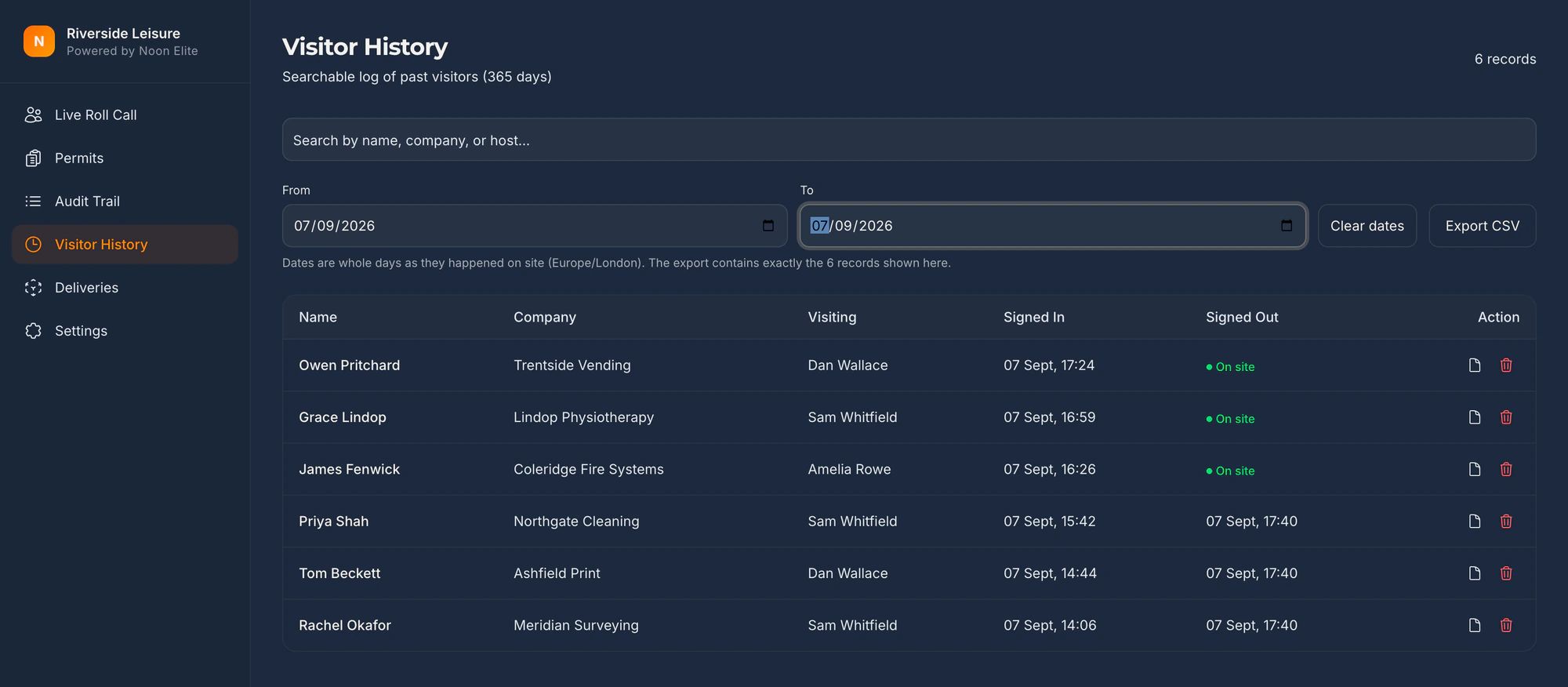
Filterable by date, by host, by company, and exportable in a format that opens without our software. Reviewing entry records is part of the control, not an optional extra.
Visitor data sits in AWS eu-west-1 on ISO 27001 certified infrastructure, under the EU-UK adequacy decision. Noon Elite is ICO registered and a data processing agreement comes as standard rather than on request. The security page has the sub-processor list, the controls and the things we are not certified for, in the shape a supplier questionnaire asks for them.
On the day
What gets asked, and what you put in front of them
| What you are asked | What you show them |
|---|---|
| How do you control access to areas holding information assets? | Your documented entry procedure, plus a live system that enforces approval before a badge is issued. |
| Show me the visitor records for a date last quarter. | A filtered, timestamped list on screen in seconds, exported to a file if they want to keep it. |
| How do you know a visitor was escorted? | The named host who approved the visit, and a badge that says on its face whether the person needed accompanying. |
| How long do you keep this data, and who can see it? | A retention period you set, automatic deletion when it expires, and a data processing agreement covering the lot. |
| What happens when reception is unstaffed? | The kiosk still captures the arrival and notifies the host directly, so the record does not depend on somebody being at the desk. |
The full visitor management system, modules and pricingContractors and RAMSThe same ground under CMMCThe log on film: one day filtered and exported, the audit trail and retentionThe same log under PCI DSS Requirement 9.3.4Our own security and sub-processors
Being straight with you
What this does not do
- We are not a certification body, an auditor or an ISO consultancy, and this is not certification advice.
- A.7 is fourteen controls out of ninety-three, and five of them touch reception. Your ISMS, your Statement of Applicability and your risk assessment are all still yours.
- A kiosk evidences physical entry. It says nothing about your access reviews, your suppliers or your backups.
- If you are certified already, bring your auditor’s wording to the call and we will tell you honestly whether this closes it.
What it does is turn one control from a description into a record. That is a small part of a certification and a disproportionately visible one, because it is the first thing an auditor walks past on the way in.
Also asked of sites like yours
The other things somebody may ask you to evidence
Each of these is a page about one standard, one duty or one visitor, written the same way as this one: what it actually asks for, what an iPad at reception records towards it, and where it does not help.
Every standard on one page: the clause numbers, the version and the date each was read, on one printable table.
- GDPR and the visitor book
- CMMC physical security
- List X visitor control
- ITAR visitor log
- Def Stan 05-138 visitor access
- PCI DSS visitor log
- AEO visitor access control
- CTPAT visitor log
- TISAX visitor management
- TAPA FSR visitor log
- BRCGS visitor control
- BRCGS packaging visitor control
- BRCGS storage and distribution visitors
- BRCGS unannounced audit
- Visitor control non-conformity
- SALSA visitor control
- IFS Food visitor hygiene
- UFAS feed mill visitor control
- GMP visitors in production areas
- GDP wholesale visitor control
- Fire roll call
- Contractor management
- Construction work in occupied premises
- HSE inspection records
- ISO 45001 contractor control
- Visitor NDA sign in
- Visitor record retention
- What a visitor log must contain
- Standards calendar
- Sign in sheet template
- Visitor health questionnaire template
- Contractor induction template
- Permit to work template
- Hot work permit template
- Fire drill record template
Advise sites on this standard? Referral terms are on one page.
Next step
Bring your auditor’s wording to the call
Fifteen minutes on the phone. Read us the control you have been pulled up on, or the question on the customer questionnaire, and we will tell you straight whether a kiosk closes it.
Book a 15 minute callNo site visit needed and nothing to install. If it is not a fit we will say so on the call.
Would rather email? [email protected]
Not the person who signs it off? Send them the one page business case