
Care homes
Visitor sign in for care homes
The front door is where a care home gives visitors its information on infection and its visiting policy, so that visits can go ahead safely. The kiosk is the visitor book on an iPad, a visitor management system for a care home: it shows your wording to each visitor, keeps a record of who accepted which version and when, and puts everyone who signs in on a roll call you can read from a phone.
Sign in on a demonstration kiosk, then open the fire roll call on your phone. Do not enter real details: everything typed is deleted within the hour.
From £599 setup and £150 a month plus VAT, iPad and stand included.
Who this is for
A home where the signing in book sits by the door
Relatives most days, a GP or a district nurse most weeks, agency staff on a busy shift and a contractor when the boiler goes. The book by the door was there before anybody asked what it was for. It does three jobs: telling visitors what you need them to know before they go in, knowing who is in the building if the alarm goes, and keeping the last visitor’s name off the open page. The kiosk is there so the visit happens. It never stops one.
What the documents say
The code, regulation 9A and the fire guide, clause by clause
Three documents reach the front door of a care home in England. The infection code of practice is statutory guidance: CQC takes it into account and it says “should”, and in its own words “the code is not mandatory”. Regulation 9A is law, and it is about making visits happen. The fire guide is the government’s guidance for care premises under the Fire Safety Order. None of the three asks for a visitor book. All three are for England: Wales (Care Inspectorate Wales) and Scotland (the Care Inspectorate) have their own rules, and this page does not cover them.
| What the source says | What the record shows | What stays with staff |
|---|---|---|
| Code of practice, criterion 4“Provide suitable accurate information on infections to service users, their visitors and any person concerned with providing further social care support or nursing/medical care in a timely fashion.” | Your wording on screen at the door, before anybody signs in, and a record of each visitor who accepted it: who, when, who they came to see, and the exact wording. | What the information says, and whether it is suitable and accurate. That is your IPC lead’s call, not the kiosk’s. |
| Code of practice, guidance 4.2Among the themes of that information: “the importance of compliance by visitors with hand hygiene procedures”, “the importance of compliance with the registered provider’s policy on visiting”, and “the importance of compliance with the registered provider’s policies to prevent introduction of infection to the service, including through visiting”. | Your hand hygiene line, your visiting policy and your outbreak line, in one text, accepted before the visitor goes in. | Whether visitors then wash their hands. The record shows the wording was accepted, not that it was followed. |
| Code of practice, Appendix A, criterion 4“For adult social care services providing residential care, all the information suggested in the guidance should be included.” | Nothing on its own. The kiosk shows what you write, so what goes in is your decision. | Deciding what the full set of information is, and where the rest of it lives: leaflets, your website, a conversation. |
| Code of practice, guidance 6.1A registered provider “should, so far as is reasonably practicable, ensure that its staff, contractors, visitors and others involved in the provision of care co-operate with each other”. | Contractors and visiting professionals sign in on the same screen as relatives and accept the same wording. | The co-operation itself. A contractor who has accepted your wording still needs a person to tell them where not to go. |
| Regulation 9A(2)(a)Residents staying in a care home “must be facilitated to receive visits”. | Four boxes and one screen of your wording, with no question to fail. Nothing on the kiosk turns a relative away. | Every decision about a visit. The kiosk makes none. |
| Regulation 9A(3)(b)The registered person must take “such action, or putting in place such precautions, as is necessary and proportionate to ensure that service users may receive visits or be accompanied safely”. | Information at the door is one proportionate precaution, and the record shows it was given to each visitor. | What else is proportionate for this resident, this week. That is a judgement, and it is yours. |
| Fire guide, step 2, page 14Consider “who else may be at risk, such as visitors, visiting contractors etc., and where these people are likely to be found”, paying attention to people “unfamiliar with the premises, e.g. agency or temporary staff, guests, visitors (including visiting medical or social care staff), contractors”. | Every visitor and contractor signed in now, with who they came to see and when they arrived. | Where they are in the building. The record knows who they came to see, not which room they are in. |
| Fire guide, pages 113 and 116Instruction may be needed about “carrying out evacuation roll calls”. At a drill: “Carry out a roll call as soon as possible at the designated assembly point(s)… You should note any people who are unaccounted for. In a real evacuation this information will need to be passed to the fire and rescue service on arrival.” | A live list of the visitors and contractors signed in, on a phone, for that roll call. | Residents and your own staff. They are not on the kiosk’s list, so your resident list and your rota stay part of the roll call. |
- DHSC, Health and Social Care Act 2008: code of practice on the prevention and control of infections and related guidanceGOV.UK page updated 13 December 2022. Criterion 4, guidance 4.2 and 6.1, and Appendix A are quoted from the HTML version, read 27 September 2026.
- Regulation 9A, Health and Social Care Act 2008 (Regulated Activities) Regulations 2014Visiting and accompanying in care homes, hospitals and hospices, in force from 6 April 2024. Quoted from legislation.gov.uk, read 27 September 2026.
- HM Government, Fire safety risk assessment: residential care premisesPublished under Article 50 of the Regulatory Reform (Fire Safety) Order 2005, first published on GOV.UK 6 July 2006 and held by the Home Office. Pages 14, 27, 113 and 116 of the PDF are quoted, read 27 September 2026.
What the kiosk does
The signing in book’s jobs, done by an iPad by the door
Your wording at the door
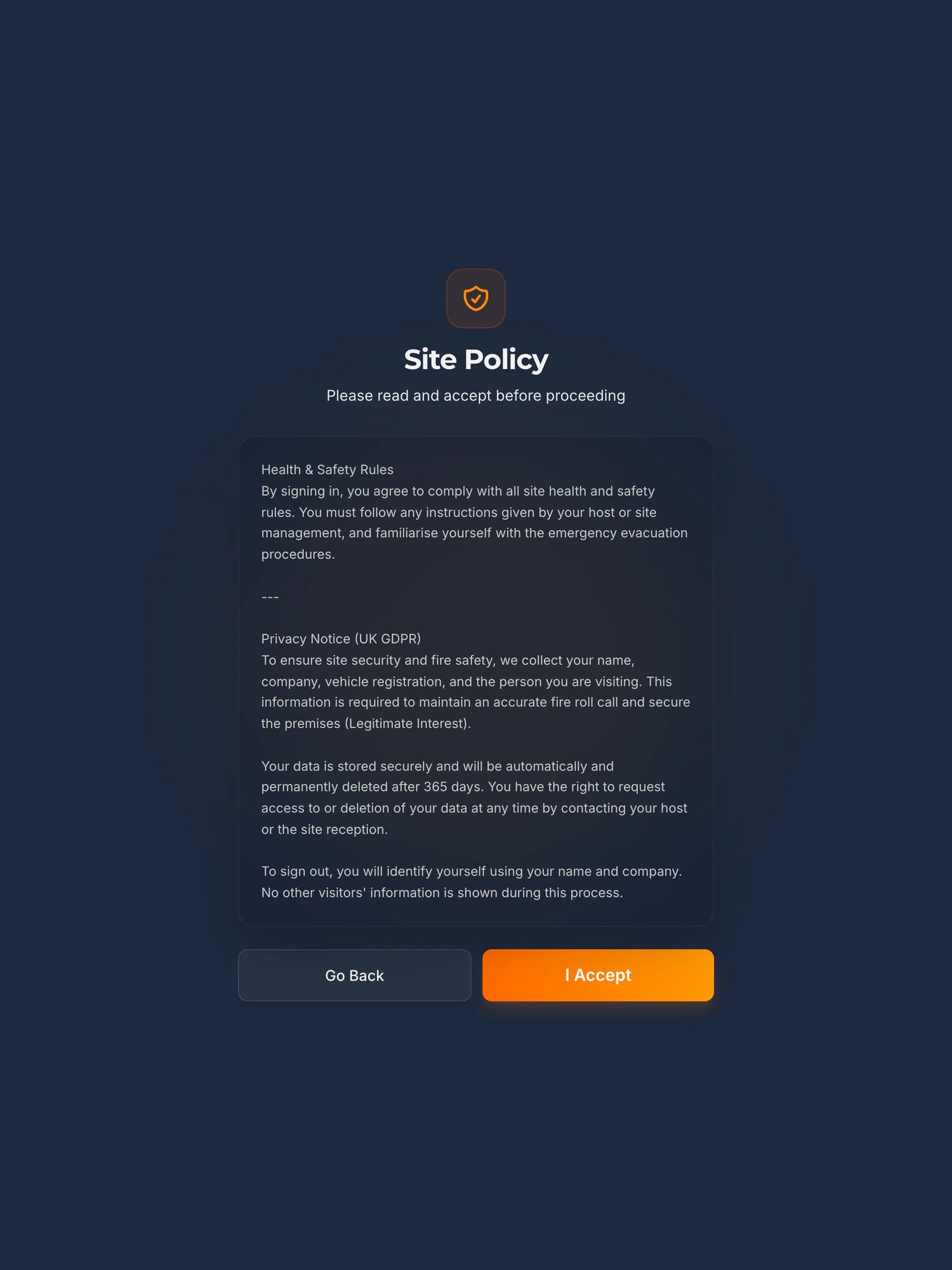
Hand hygiene, your visiting policy, “please do not visit if you have had sickness or diarrhoea in the last 48 hours”: whatever the home writes goes on screen before anybody signs in. Nobody is signed in without accepting it.
Which wording, and when
Each acceptance is kept with the person, the time and a fingerprint of the exact text they were shown. Change the wording and change it back, and every visitor’s record still points at the words that were on the screen for them.
Who is in, and who they came to see
Name, company, who they are visiting, the time in and the time out, and a car registration if they give one. Search by name, company or date, and export it.
Visitors on the roll call
A live list on a phone of every visitor and contractor signed in at the kiosk. Nobody goes back to reception for the book.
The visitor management kiosk in fullHow the accepted wording is kept
Outbreak weeks
Change the wording when you need to, and change it back
When there is sickness in the home, the words at the door change: please do not visit if you have had sickness or diarrhoea in the last 48 hours, visit in the resident’s room only, wash your hands on the way in. Edit the text in your dashboard and save it. When the outbreak is over, put the usual wording back.
Every wording the kiosk has shown is kept, once, with a fingerprint, and can never be edited afterwards. Each visitor’s record points at the wording that was on the screen when they accepted it. So when somebody asks later what a visitor was told on a given day, the record shows the outbreak wording for the visitors who saw it and the usual wording for everyone else.
One thing to know: the iPad loads the wording when the kiosk starts, not the moment you press save. After a change, reload the kiosk and read the screen before the next visitor signs in. Support is included if you want us on the phone while you do it.
When the alarm goes
Visitors and contractors on the roll call, and who is not
The fire guide for care premises asks you to think about visitors, visiting contractors and visiting medical or social care staff, people “unfamiliar with the premises”, and to carry out a roll call. The kiosk gives you the part of that roll call the home cannot know from its own records: which visitors and contractors are in the building now.
- Every visitor and contractor signed in at the kiosk and not yet signed out, on a live list you open on a phone.
- Who each one came to see and when they arrived.
- Residents and your own staff are not on it. Your resident list and your rota stay part of the roll call.
- A courier who only uses Delivery Drop-off is logged, but is not signed in and is not on the list.
Many care homes use progressive horizontal evacuation, moving residents through a fire resisting barrier to a protected area on the same floor, rather than taking everybody out to an assembly point. The guide describes both. Whatever your strategy, the kiosk’s list does the same job: it says which visitors and contractors are in the building.
See it work
A sign in and a fire roll call, in 100 seconds
Not filmed in a care home, and the screens are the same. A visitor signs in on the iPad. The alarm goes. The marshal opens the live list on their phone and reads off who is still on site.
The player loads from YouTube only when you press play. Nothing is sent to Google before that. What happens when you do.
Being straight with you
What it does not do in a care home
It asks every visitor for a company name.
The field is required and labelled Company Name. A relative can put “Family” or their own surname. Visiting GPs, district nurses, social workers, agency staff and contractors have one already.
The roll call lists visitors and contractors who signed in at the kiosk, and nobody else.
It does not list residents or your own staff. Your resident list and your rota stay where they are, and stay part of your roll call.
It does not ask questions or record answers, check ID, take signatures or keep health information.
It records that the visitor accepted your wording, with the time and the exact text. Nothing more.
It does not decide who may visit.
A visitor who taps Go Back is not signed in, and talks to your staff. What happens next is decided by the home, under its own visiting policy.
“Person visiting” is a staff list or free text, not a list of residents.
It is a dropdown if the home loads a staff list, and free text if it does not. For visits to residents free text is the honest setup, which puts the resident’s name in the visitor record; the data protection section below says what that means.
Data protection
A resident’s name in the visitor record
“Person visiting” is a dropdown of your staff if you load a staff list, and free text if you do not. For visits to residents, free text is the honest setup, and it means the resident’s name is written into the visitor record. If you connect a Teams or Slack channel, the message for each sign in carries it too. Put that in your own privacy information for residents and families.
You are the controller and we are the processor, under a data processing agreement supplied as standard. You set one retention period, from a day to two years with a year as the default, and records are deleted automatically when it runs out. The data is held in the European Union, in Ireland.
Where the data lives, and every sub-processorGDPR and the paper visitor bookHow long to keep visitor records
What it costs
One price, in public
Setup from £599, then £150 a month plus VAT for the home. The iPad, the stand, hosting and support are included, the iPad and stand are replaced if they fail, and nothing is charged per visitor. A group with more than one home is priced on a call.
Every price, and what is not charged forOur terms in plain English
Before you ask
The questions a registered manager asks first
Does CQC require a visitor book?
No. Neither the infection code of practice nor regulation 9A asks for a visitor book or a digital system, and we know of no CQC regulation that does. The code asks you to give visitors suitable information on infections, including hand hygiene and your visiting policy, and it says of itself that it is not mandatory: CQC takes it into account, and a home may meet the regulations another way. Regulation 9A says residents must be facilitated to receive visits, with precautions that are necessary and proportionate. A record of who is in the building usually comes from your fire risk assessment, because the government fire guide for care premises asks you to think about visitors and to carry out a roll call.
Do relatives have to give a company name?
Yes. Company Name is a required field for every visitor, and the kiosk cannot be set to skip it. “Family” or their own surname is fine. Visiting professionals and contractors put their employer.
Can the kiosk stop someone visiting?
No. It shows your wording and records who accepted it. A visitor who taps Go Back is not signed in and speaks to your staff, and the decision is the home’s, under its visiting policy. Nothing on the kiosk turns a visitor away.
Can we change the wording during an outbreak?
Yes, from your dashboard, and back again when it is over. The iPad picks up the new wording when the kiosk next loads, so reload it after saving and read the screen before the next visitor. Each visitor’s record keeps a fingerprint of the words they were shown, so the old and new wording can both be shown afterwards.
Are residents on the fire roll call?
No. The roll call lists the visitors and contractors signed in at the kiosk, and not residents or your own staff. Your resident list and your rota stay part of your roll call, whatever your evacuation strategy.
Does it keep health information about visitors?
No. It asks no questions and stores no answers. If your wording says “do not visit if you have had sickness or diarrhoea in the last 48 hours”, the record shows the visitor accepted that wording, and nothing about their health.
Also asked of sites like yours
The other things somebody may ask you to evidence
Each of these is a page about one standard, one duty or one visitor, written the same way as this one: what it actually asks for, what an iPad at reception records towards it, and where it does not help.
- GDPR and the visitor book
- CMMC physical security
- List X visitor control
- ITAR visitor log
- Def Stan 05-138 visitor access
- ISO 27001 visitor access
- PCI DSS visitor log
- AEO visitor access control
- CTPAT visitor log
- TISAX visitor management
- TAPA FSR visitor log
- BRCGS visitor control
- BRCGS packaging visitor control
- BRCGS storage and distribution visitors
- BRCGS unannounced audit
- Visitor control non-conformity
- SALSA visitor control
- IFS Food visitor hygiene
- UFAS feed mill visitor control
- GMP visitors in production areas
- GDP wholesale visitor control
- Fire roll call
- Contractor management
- Construction work in occupied premises
- HSE inspection records
- ISO 45001 contractor control
- Visitor NDA sign in
- Visitor record retention
- What a visitor log must contain
- Standards calendar
- Sign in sheet template
- Visitor health questionnaire template
- Contractor induction template
- Permit to work template
- Hot work permit template
- Fire drill record template
Next step
Tell us how visitors come into your home today
Fifteen minutes on the phone. Where the book sits, who comes through the door, and what you tell them before they go in. We will tell you straight whether a kiosk is worth it for your home.
Book a 15 minute callNo visit needed and nothing to install. If it is not a fit we will say so on the call.
Would rather email? [email protected]
Not the person who signs it off? Send them the one page business case