
TISAX and VDA ISA 6
TISAX visitor management: one control asks about your reception, and this is what it wants
A customer has asked for a TISAX label, you have the VDA ISA workbook open, and you have reached security zones. This page quotes control 3.1.1 from the catalogue itself, with the version and the dates from ENX, says which of its lines are must and which are should, and sets out what an iPad at the door records towards each. It does not say the kiosk gets you a label, because nothing does.
Sign in on a demonstration kiosk, then open the fire roll call on your phone. Do not enter real details: everything typed is deleted within the hour.
From £150 a month plus VAT, iPad and stand included. We are not an audit provider or a consultancy.
In Ireland or elsewhere in the EU? The installed kiosk on this page is sold in the UK. For EU sites: the same software on an iPad you already own, with the record kept in the EU, from €179 a month.
What the catalogue asks
One control question, and the visitor line under it
VDA ISA 6 is a workbook. Each control is a question with requirements listed beneath it as must, should, and additional for high and very high protection needs. The catalogue’s own words for 3.1.1 are below, column by column, and the prototype protection control that applies to some suppliers and not others is last.
Control 3.1.1
Security zones, the control question
To what extent are security zones managed to protect information assets?
The one control question in the information security catalogue that reaches your reception. Everything below is a requirement listed under it, in the catalogue’s own columns. Its cross reference column points at ISO 27001:2022 A.7.1 to A.7.6, which is the same ground the ISO 27001 page on this site covers.
3.1.1, requirements (must)
A zone concept, implemented and known
A security zone concept including the associated protective measures based on the requirements for the handling of information assets is in place: physical conditions (e.g. premises / buildings / spaces) are considered in the definition of security zones, this also includes delivery and shipping areas. The defined protective measures are implemented. The code of conduct for security zones is known to all persons involved.
Three things at must level. The last one is the visitor’s: a visiting engineer is one of the persons involved, and the code of conduct has to have reached them, which means being able to show that it did.
3.1.1, requirements (should)
Visitor management policies
Visitor management policies (including registration and escorting of visitors) are defined.
The line this page exists for. It sits at should level with four others, among them procedures for allocation and revocation of access rights and policies for carrying along and using mobile IT devices and mobile data storage devices, which the catalogue says should include registration before they are carried along.
3.1.1, high protection needs
Overhearing and viewing
Protective measures against simple overhearing and viewing are implemented. (C)
The additional requirement for information with high protection needs. An open visitor book on the counter, showing the last twenty names and companies to the twenty-first, is the plainest example of simple viewing there is.
Control 8.1.7, prototype protection
Documented visitor management
To what extent is a documented visitor management in place? Registration obligation for all visitors. Documented non-disclosure obligation prior to access. Publication of security and visitor regulations. Country-specific legal provisions regarding data protection are to be observed.
Only in scope if your assessment objective includes prototype parts or vehicles: section 8.1 applies to companies which, on their own properties, manufacture, store or are provided for use vehicles, components or parts classified as requiring protection. All four lines are must level. ISA 2027 renumbers it 8.1.8 and asks the question as regulations for visitor management (including registration and escorting of visitors), with the same four requirements.
Quoted from VDA ISA version 6.0.3, the English workbook published by ENX, read on 26 September 2026, and checked the same day against VDA ISA 2027. The workbook marks 3.1.2 as superseded by 1.6.3, 5.2.8 and 5.2.9, which are crisis management, continuity and backup, so 3.1.1 is the only physical security control question in the information security catalogue that mentions visitors. Nothing in it tells you to buy anything.
Version and scope
Which catalogue, which version, which objective
Four facts from ENX’s own pages that decide what your assessment is measured against. Confirm them with your audit provider; they moved once in 2024 and move again in 2027.
- VDA ISA 6.0.3The catalogue this page quotes. Cover dated 12 April 2023; listed by ENX as published 25 April 2024 and as the basis of TISAX assessments starting after 1 April 2024. The information security sheet holds 3.1.1; the prototype protection sheet holds 8.1.7.
- VDA ISA 2027Version dated 1 July 2026. ENX says it is the basis of assessments ordered from 2027, that assessments ordered before 1 January 2027 can still be performed with ISA 6, and that the last date to open an initial assessment under ISA 6 is March 2027. The wording of 3.1.1 quoted here is unchanged in it.
- Target maturityThe catalogue’s maturity levels sheet says the target maturity level for all control questions is consistently 3, Established. That applies to 3.1.1 like any other.
- Assessment objectivesHandbook 2.8, section 4.3.3.5, maps each objective to an assessment level: Confidential and High availability to AL 2, Strictly confidential, Very high availability, Proto parts and Proto vehicles to AL 3. Your partner’s request decides which you register for, and that decides how the assessment is done.
At the door
Registration, escorting and the code of conduct, as a record
The requirement asks for policies to be defined. An assessor then asks to see them working, and the thing that shows a policy working is a record of it being applied to a named person on a given day.
Registration: every visitor on the record
Name, company, the person they have come to see, a vehicle registration if they drove in, and the time they signed in. They sign out on the same screen, and the export carries both times, or says On site where the second is missing.
Escorting: a named host, told at once
Every sign in needs a host, and the host is told by name in Microsoft Teams or Slack the moment the visitor arrives. With the badge module, a site that requires approval prints nothing until a named approver enters a PIN on the kiosk, and the badge carries a colour band that tells anyone on the floor whether that person needs escorting.
The code of conduct, shown and accepted
Your security zone rules for visitors, no photography, no devices past a given door, stay with your host, go on the screen as the site policy. Nobody signs in without accepting them, and the record keeps who accepted which exact wording and when, with the wording fingerprinted so it can be shown later even after you change it.
Delivery and shipping areas
The zone concept has to include them, and most sites take a second unit at goods in rather than moving the first. A courier who only uses the delivery drop-off is logged as a delivery, with the time and the carrier, and is not treated as a person on site; a driver who goes beyond the dock signs in.
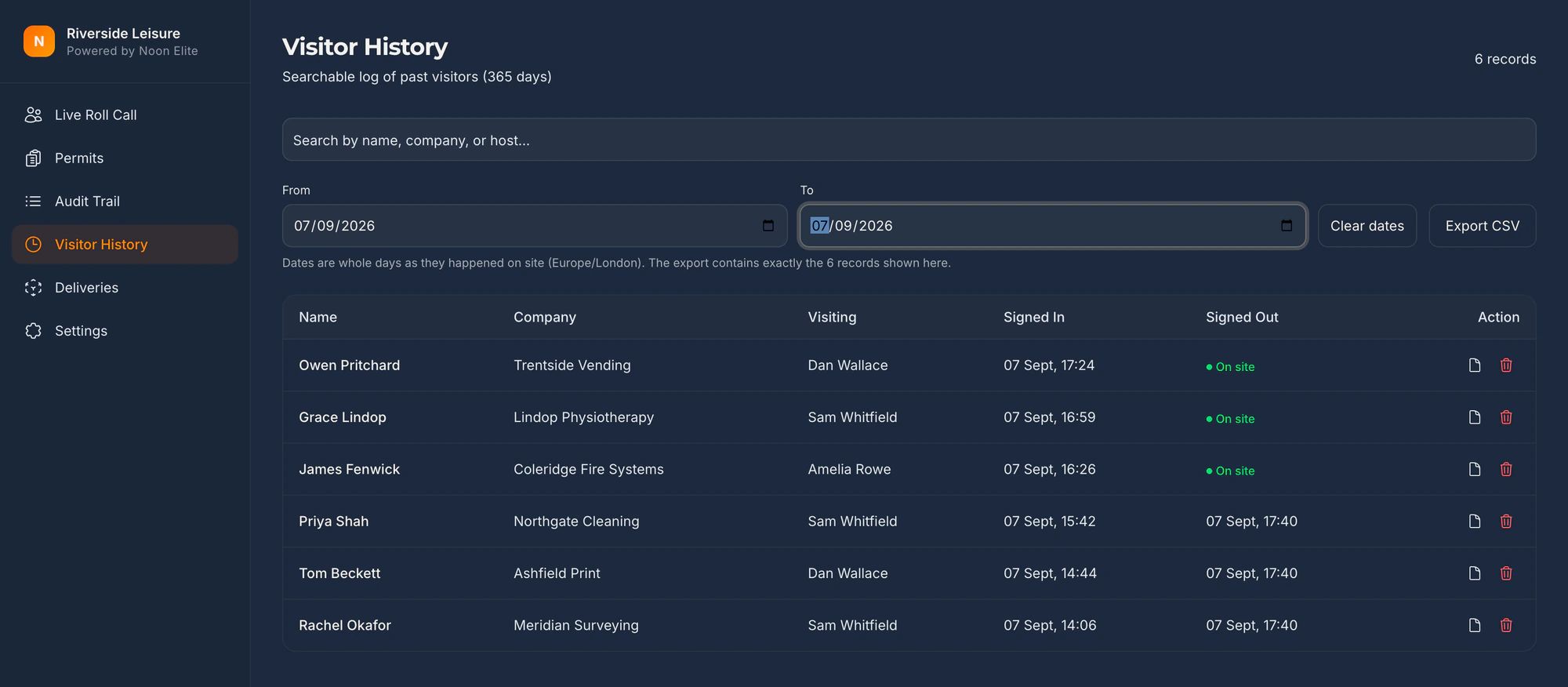
The kiosk does not make a site compliant, certified, labelled or audit ready. It produces a timestamped record for the control named on this page, and the audit provider decides what that record is worth.
The visitor management kiosk in fullThe same ground under ISO 27001 Annex A 7.2The non-disclosure wording, and exactly what is recordedThe customs equivalent, for exportersOur security and sub-processors
On the day
What gets asked, and what you put in front of them
| What you are asked | What you show them |
|---|---|
| Show me your visitor management policy. | Your own document. The kiosk is the implementation it describes: what is shown at the door, what is recorded, and for how long. |
| How are visitors registered? | The sign in record, filterable by date, host and company, on screen at the desk or exported to a file that opens without our software. |
| How do you know the code of conduct reached this visitor? | The acceptance stored against their name, with the time and the fingerprint of the exact text they were shown. |
| How is escorting enforced? | A host named on every visit and notified at once; with the badge module, a badge printed only after a named approver’s PIN, colour coded for escort status. |
| Where is the visitor data, and how long is it kept? | In the European Union, in Ireland, on ISO 27001 certified infrastructure, for a retention period you set between one day and two years, under a data processing agreement supplied as standard. |
Escorting, made visible
A badge printed only after a named approver’s PIN
The visitor signs in and waits. The host is told, walks over and enters a PIN on the kiosk. No approval, no badge. The colour band says whether the wearer needs escorting, so anyone on the floor can tell without asking.
The badge module is an add-on at £150 a month plus VAT, label printer included. The platform works without it. The player loads from YouTube only when you press play; nothing is sent to Google before that. What happens when you do.
Before you ask
The questions automotive suppliers ask on the first call
Does TISAX require a visitor log?
Control 3.1.1 of VDA ISA 6 asks, at should level, that visitor management policies including registration and escorting of visitors are defined. Registration implies a record, and the catalogue does not say what form it takes. Where prototype protection is in your assessment objective, control 8.1.7 adds a registration obligation for all visitors at must level, with a documented non-disclosure obligation before access. What your audit provider accepts as evidence for either is their decision.
Which version of the VDA ISA applies to us?
On the day this was written ENX listed ISA 6.0.3 as the current version, the basis of assessments starting after 1 April 2024, and ISA 2027 as the basis of assessments ordered from 2027, with assessments ordered before 1 January 2027 still able to use ISA 6 and March 2027 the last date to open an initial assessment under it. The wording of 3.1.1 quoted on this page is the same in both. Confirm the version with your audit provider before you build anything around a number.
Which assessment objective do we need?
The one your partner asked for. The participant handbook, section 4.3.3.5, maps each objective to an assessment level: Confidential and High availability to AL 2, Strictly confidential, Very high availability, Proto parts and Proto vehicles to AL 3. The information security catalogue, and 3.1.1 with it, applies across the information security objectives; the prototype controls apply only where prototype parts or vehicles are in scope.
Is a printed badge required?
Not by 3.1.1, which asks for registration and escorting and leaves the means to you. A badge that shows on its face whether the wearer needs escorting is one way of making escorting visible on the floor. It is a module at £150 a month plus VAT, label printer included, and the platform works without it.
Do visitors have to accept a non-disclosure obligation?
Under prototype protection control 8.1.7, yes, and it must be documented before access. Under 3.1.1 the catalogue does not say so. The kiosk can show your non-disclosure wording as the site policy and record that it was accepted, with the exact text fingerprinted. It does not take a signature, and whether an accepted screen binds a visitor is a question for your solicitor. The visitor NDA page on this site says exactly what is and is not recorded.
Will the kiosk get us a TISAX label?
No, and nothing will. A label follows an assessment by an audit provider against the whole catalogue in your scope. What the kiosk gives you is the visitor record 3.1.1 asks to see: who came in, who they came to see, what code of conduct they accepted and when, and when they left, kept for a period you set. Whether that satisfies the control, at the maturity level you need, is the audit provider’s judgement.
Being straight with you
What this does not do
- We are not a TISAX audit provider, not ENX, not the VDA and not an information security consultancy. This is general information about a published catalogue, not assessment advice.
- Control 3.1.1 is one control question of the information security catalogue, and the visitor line under it is a should. Your ISMS, your zone concept, your access rights process and every other control question are yours.
- The kiosk lives at reception. It does not open doors, hold keys, badge your own staff or say anything about your network, your prototypes or your backups.
- A TISAX label is granted after an assessment by an audit provider. Nothing we sell gets anyone a label or passes an assessment. The kiosk produces the visitor record the control asks to see, and the audit provider decides what it is worth.
- TISAX and ENX are registered trademarks of ENX Association. VDA ISA is published by the Verband der Automobilindustrie. Neither has any connection with Noon Elite.
Sources
Check any of this yourself
- VDA ISA 6.0.3, English workbookThe catalogue itself, published by the VDA and hosted by ENX. Controls 3.1.1 and 8.1.7 are quoted from it. Read 26 September 2026.
- VDA ISA 2027, English workbookThe next version, dated 1 July 2026, read the same day to check the quoted wording against it.
- ENX, TISAX download centreWhere both workbooks and the handbook are published, with the dates from which each version applies.
- TISAX Participant Handbook, version 2.8Dated 13 March 2025. Section 4.3.3.5 maps assessment objectives to assessment levels.
General information about a published catalogue, not assessment advice. Control numbers move between versions; confirm against the workbook your audit provider is using.
Also asked of sites like yours
The other things somebody may ask you to evidence
Each of these is a page about one standard, one duty or one visitor, written the same way as this one: what it actually asks for, what an iPad at reception records towards it, and where it does not help.
Every standard on one page: the clause numbers, the version and the date each was read, on one printable table.
- GDPR and the visitor book
- CMMC physical security
- List X visitor control
- ITAR visitor log
- Def Stan 05-138 visitor access
- ISO 27001 visitor access
- PCI DSS visitor log
- AEO visitor access control
- CTPAT visitor log
- TAPA FSR visitor log
- BRCGS visitor control
- BRCGS packaging visitor control
- BRCGS storage and distribution visitors
- BRCGS unannounced audit
- Visitor control non-conformity
- SALSA visitor control
- IFS Food visitor hygiene
- UFAS feed mill visitor control
- GMP visitors in production areas
- GDP wholesale visitor control
- Fire roll call
- Contractor management
- Construction work in occupied premises
- HSE inspection records
- ISO 45001 contractor control
- Visitor NDA sign in
- Visitor record retention
- What a visitor log must contain
- Standards calendar
- Sign in sheet template
- Visitor health questionnaire template
- Contractor induction template
- Permit to work template
- Hot work permit template
- Fire drill record template
Advise sites on this standard? Referral terms are on one page.
Next step
Bring the control wording to the call
Fifteen minutes on the phone. Read us the line your assessor or your customer has pointed at, tell us which objective you are registering for, and we will tell you straight whether a kiosk produces the record it asks for.
Book a 15 minute callNo site visit needed and nothing to install. If it is not a fit we will say so on the call.
Would rather email? [email protected]
Not the person who signs it off? Send them the one page business case